Grandpa Giant Fish AI Trend: Make the Photo-to-Video Beats Yourself
Four photo-to-video beats from the first week of November 2026, rebuilt from a photo you can use. Paper Gen on Seedream 5.0, one canvas grade, then Seedance 2.5.
VibePaper does not ship these CapCut templates. This page teaches the beat and gives you prompts. The pictures here are original stills: backs turned, faces hidden, a generated macaque. They are not frames from the TikTok posts. Use a photo you have rights to, of an adult who agreed, or draw an original Paper Gen character. Do not paste a child’s photo, a public figure, or someone else’s clip.
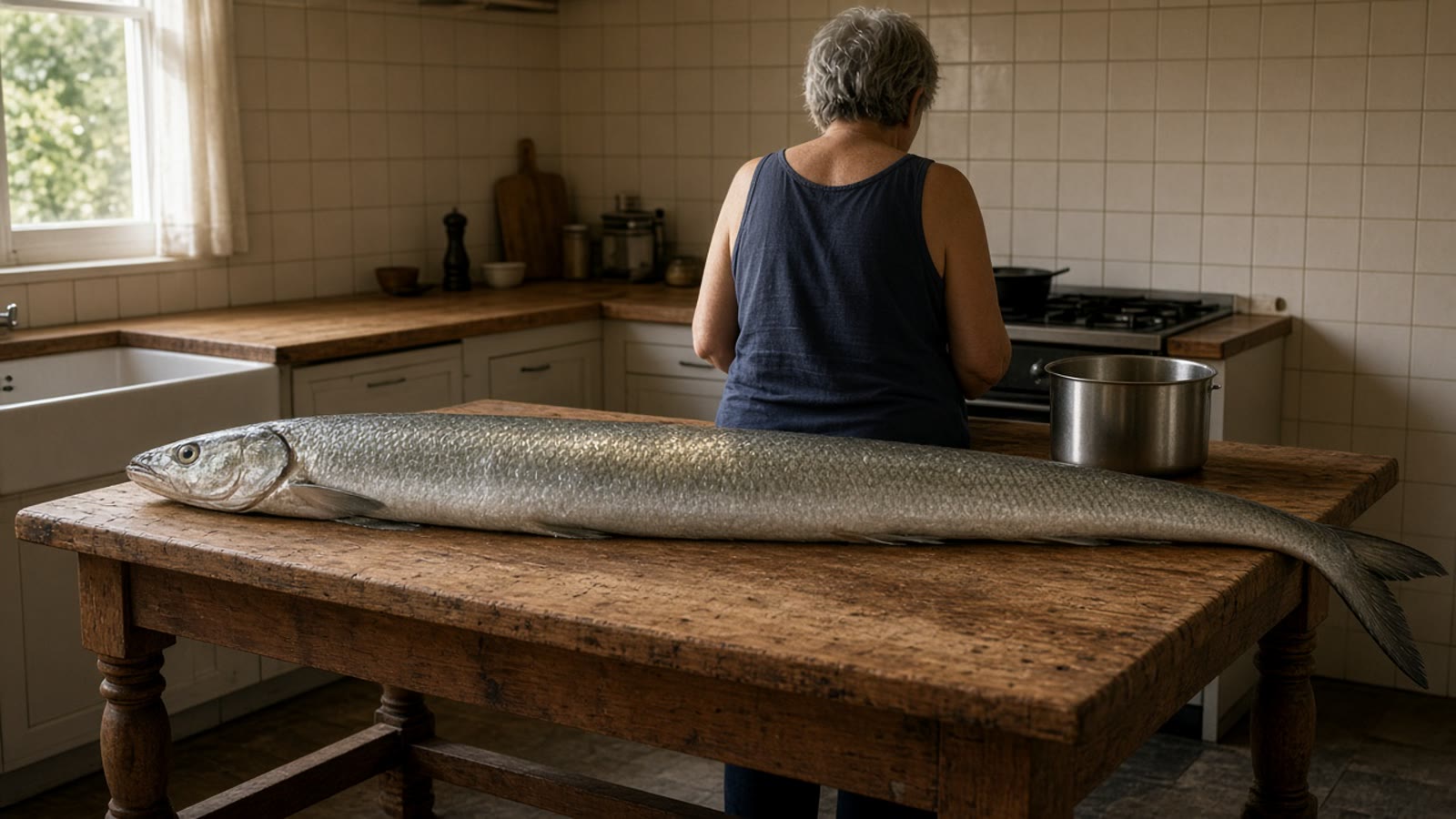
On 8 November 2026 EffectDrop read the TikTok pages behind the week’s photo-to-video templates. The clip that led the set was posted by @marcel.pectoral on 3 November: nine seconds, the on-screen line “POV: Grandpa said he’d handle dinner,” a muscular grey-haired person in a tank top at a kitchen island, cutting a whole fish that runs the length of the counter. By 8 November that post had 14.9 million views. Remakes put someone else in that place, usually from one photo. The same roundup dates the “cause I’m the one” shoulder carry to CapCut templates from 1 November (two photos), the flamingo pool-float “Thank you bro” clip to @youneszarou on 2 November (one photo, 11 seconds, 28 million views and 2 million likes by 8 November), and the monkey-and-apple posts to @user7453115952617 on 1 November (one photo, a 19-second post at 3.3 million views by 8 November).
Keep the beat. Change the person, the room, and the words.
Template versus this page
What the posts do, and what you run here
The left column is the reporting. The right column is only a control that exists in VibePaper. A Seedance clip is not a CapCut template, and it does not attach a TikTok sound.
Reported this weekIn VibePaper
EffectDrop: the clips spread as CapCut templates. You open a post that shows the template link and upload a photo. EffectDrop does not make these clips.There is no template slot for these four beats. Paper Gen draws a still on Seedream 5.0. Seedance 2.5 moves it. You write the beat.
One photo for the fish, the flamingo, and the monkey. Two photos for the shoulder carry, one of each person, ideally full body and in different clothes so the two do not blend.Seedream 5.0 takes up to 14 reference images. Attach the photo you are allowed to use. The deep link fills the model and the prompt. It does not upload the photo, and it does not set the ratio.
The flamingo post uses an instrumental of “Under the Sea.” Remake the Trend, read on 7 November, says shoulder-carry posts often use the sound “original sound - altsharp” (2,330 TikTok videos on that read). EffectDrop says the shoulder captions quote an explicit lyric.Turn Sound off. Seedance 2.5 will not match those platform sounds, and this page does not ask it to sing. Add a sound you are allowed to use when you post.
VideoIdeas, dated 3 November, says the useful move is the beat structure, not a copied template, and that platforms increasingly demonetize unlabeled realistic AI. That piece lists other formats. It does not document these four clips.One prompt per beat, below. Label the upload. The image-to-video guide is where a single still is the whole lesson. This page does not repeat it.
Photo to video · 10 November 2026
Five steps, then the beat changes
The links fill the model and the prompt. They do not set Aspect ratio, Duration, Reference mode, Sound, or Draft preview. Paper Gen reads the prompt once, then removes it from the address bar, so a reload will not wipe the next edit.
01
Start from a photo you can use.
An adult who agreed, in a photo you have rights to. Or skip the photo and let Seedream 5.0 draw an original character, back to camera for the kitchen, faces turned away for the carry. EffectDrop notes that the monkey original shows a small child, and says to think twice before posting a child’s face. This page does not use one.
02
Draw the still in Paper Gen.
Image. Model Seedream 5.0, the default. Set Aspect ratio to 9:16 before Generate. Attach your photo as a reference when you have one. Paper Gen has no style chip. Generate one still per beat. “4 more like this” repeats the current prompt. Use it only when that one frame is close and you want another take.
03
Grade once, on the canvas.
On a still you will keep, press Continue in Canvas. Leave Style library empty. Open Color grade and use Color correction on every still of that beat, or on none. Camera movement stays off. The reasons are in the next section.
04
Move it in Seedance 2.5.
One still: Make it a video. That switches to the video composer and attaches the still as a reference. It does not place a last frame. A locked ending, which the shoulder carry wants: draw the landing still, switch the mode to First / last frame, and put the stills in the two slots. That mode sets Aspect ratio to adaptive, so both stills should already be 9:16. Set Duration by hand. The default is Auto. Sound defaults to on. Turn it off. Draft preview on only for the cheap try: it locks the pass to 480p, and the finish is a separate charge. Read the points before you generate.
05
Post your version, and label it.
EffectDrop says TikTok asks you to label realistic AI-generated video, and that YouTube and Instagram have similar rules. The caption is yours. Do not ask Seedance to paint the on-screen line into the picture. If you cut more than one beat together, the canvas Compose card stitches clips, and Cut exports. Neither card is required for a single nine-second kitchen shot.
Paper Gen has no style chip. Style is on the canvas generate row, inside Style library. A preset appends its own fragment. It does not know that the fish has to stay a fish, or that two people have to stay two people. Color grade is a different tool. Camera movement is video only, and Paper Gen has no camera chip. If you generate the video on the canvas, the chip is there.
Style off
Leave it empty on the still and on the video. AI Realistic, American Realistic, Suspense, Showa Retro, Lego, and Plush Toy are real presets. Each one changes the picture. A phone kitchen does not need a film grade on top of the window light you already approved.
Color correction
This is the grade, if the stills of one beat must match. On the canvas, open Color grade and pick Color correction. Apply it to every still of that beat, or to none. Do not put it on the kitchen and leave the landing still bare.
Camera off
Push In dollies toward the subject. Orbit Clockwise circles it. Either one fights a fixed phone frame, which is the whole joke of these beats. Leave Camera movement off and write the small move in the prompt.
Sound off
Seedance 2.5 defaults Sound to on. These beats use a platform sound, not a score the model should invent. Turn Sound off. Draft preview stays off unless you want the 480p try first.
One beat at a time
Four beats, with the prompt ready to copy
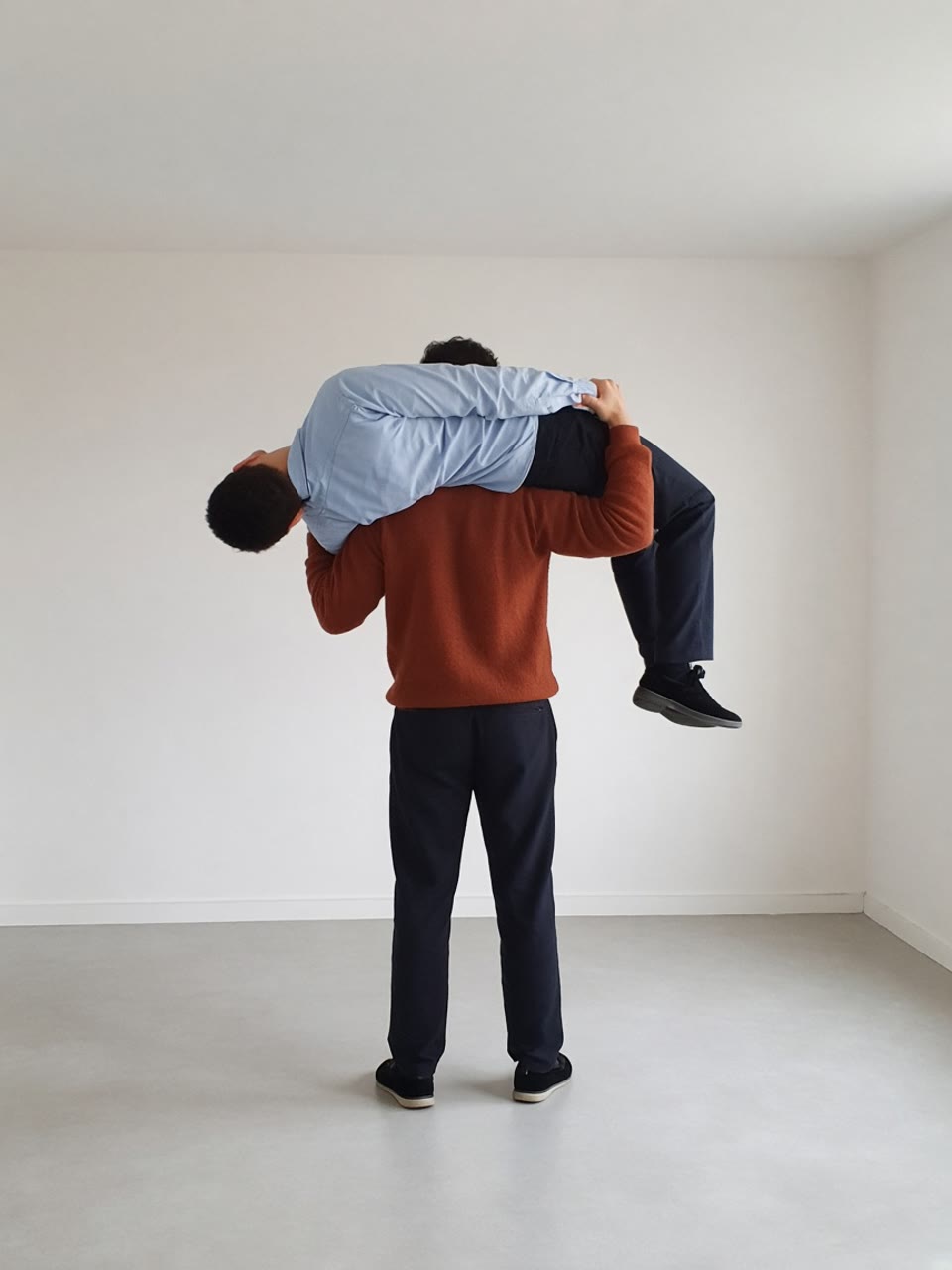
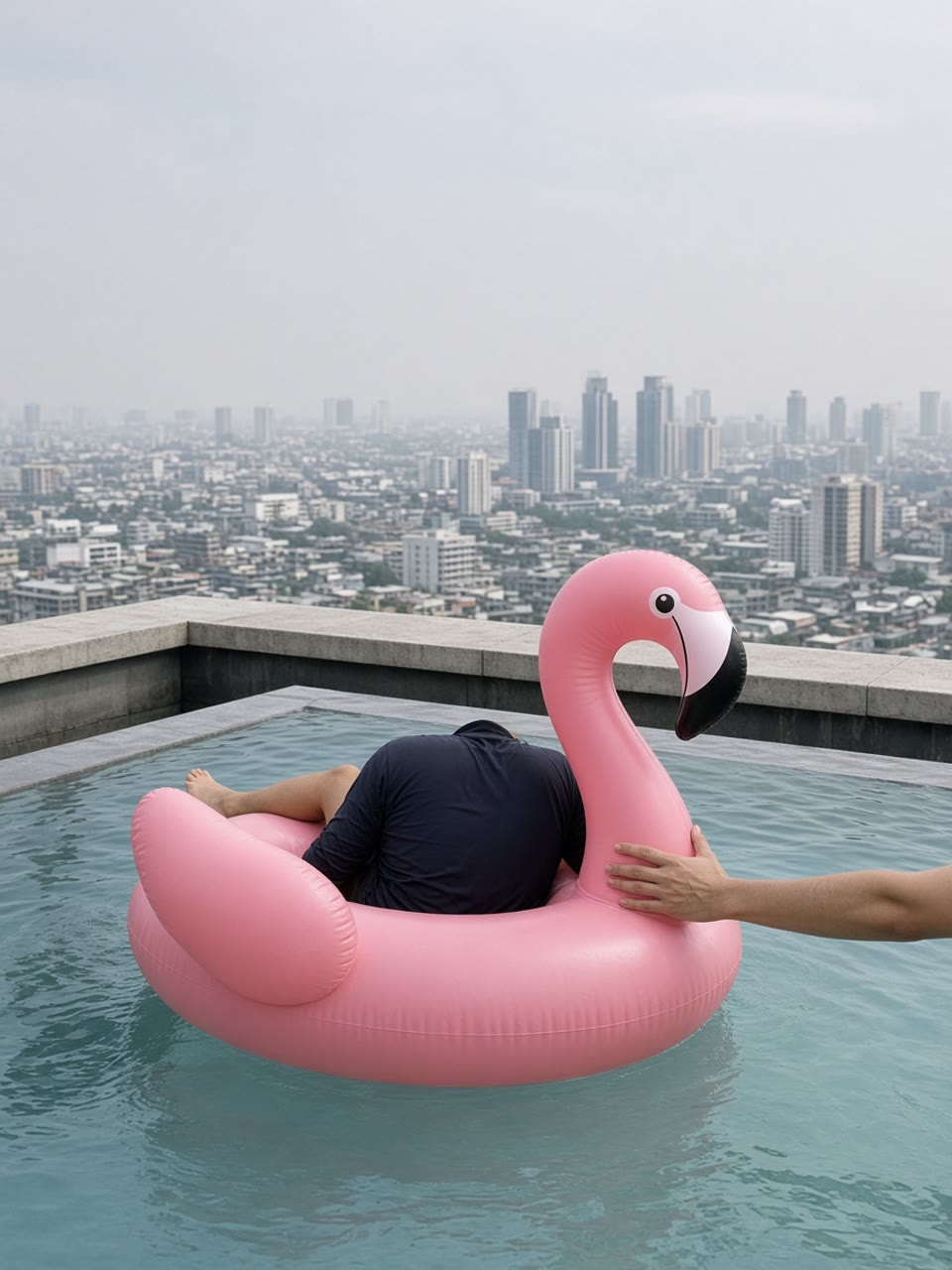
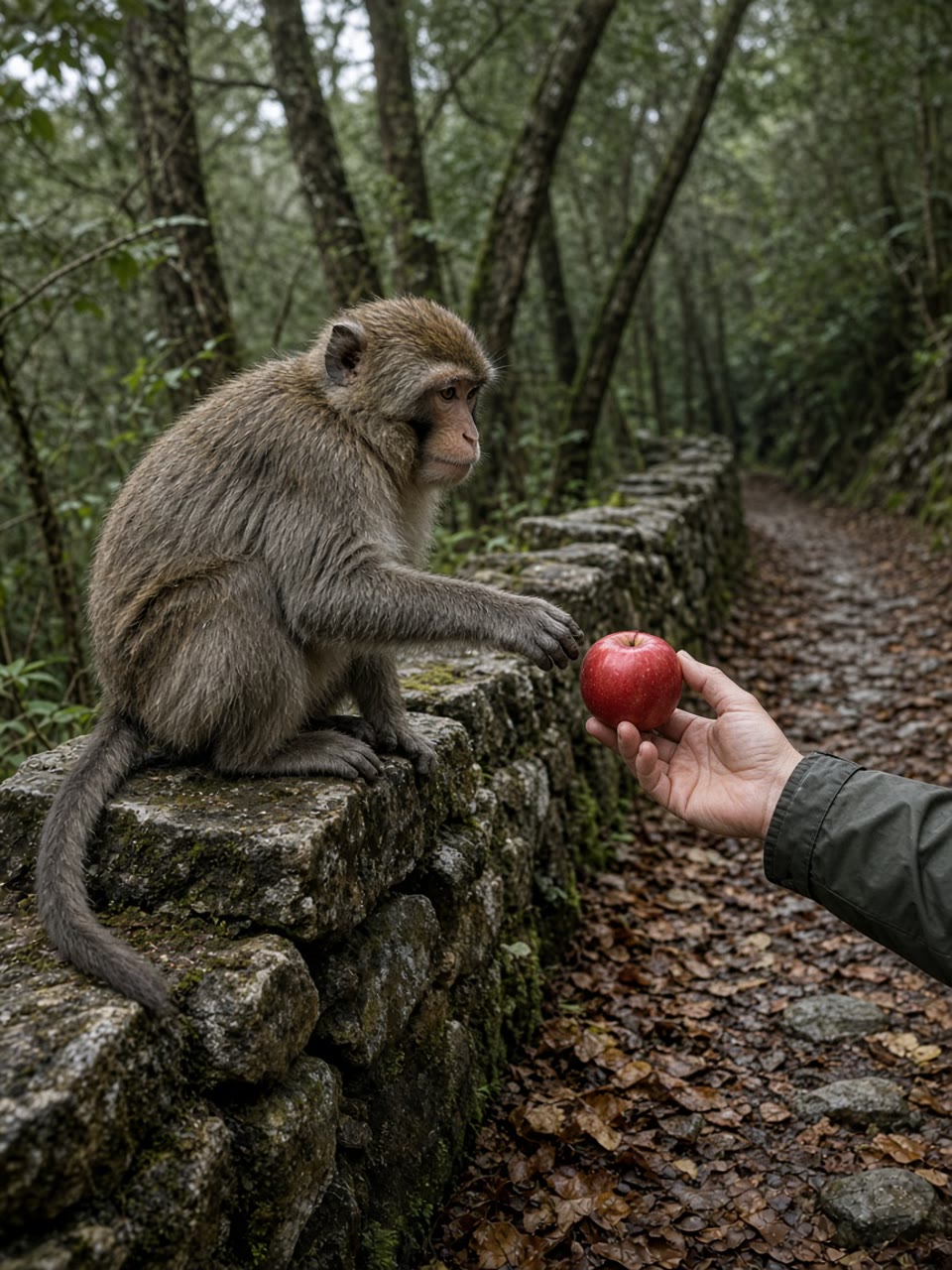
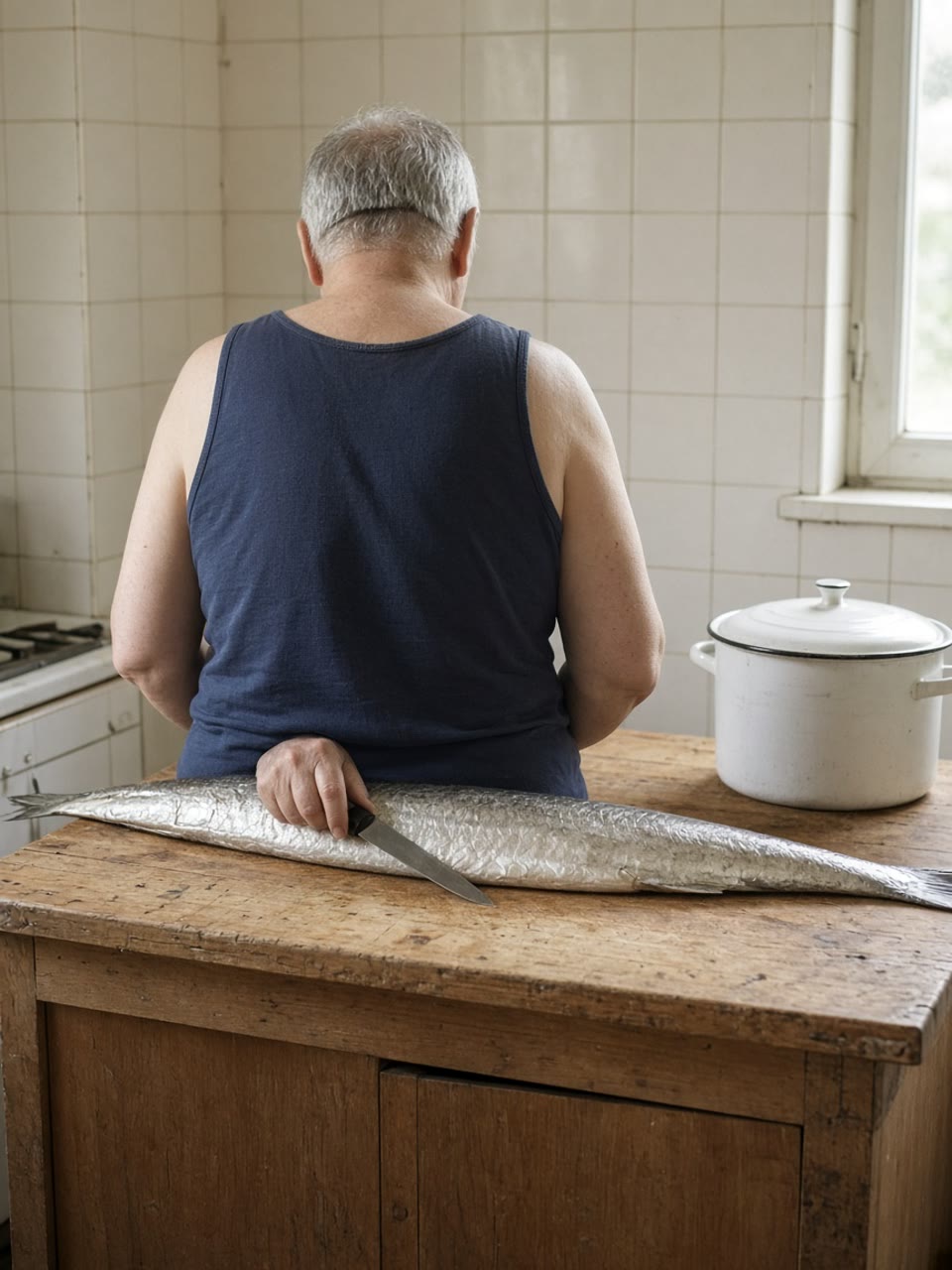
Copy the prompt as it is, then attach your own photo. The stills on this page are examples of the beat, shot so that no face is the subject. They are not a matched first-and-last pair, and they are not the original posts. In Paper Gen, set 9:16 yourself. The wide frame at the top is the article, not the export.
01 · Grandpa’s giant fish
01Grandpa’s giant fish
Photos: one.
Tool: Seedream 5.0, then Seedance 2.5.
Mode: Make it a video.
Grade: off, or Color correction on the still.
Duration: 9 seconds.
EffectDrop’s 8 November read: the 3 November post is nine seconds, and a CapCut template post by @tei6707 on 5 November (697,800 views) shows a hand measuring the fish before the chopping starts. A second caption, used as a trading joke, is credited to an Instagram account EffectDrop could not open, so this page does not use it. Search results still mix this clip with older videos of someone slamming a fish and breaking a plate. This beat is the long fish and the even slices. The person in the still can be your photo, used as a reference, or an original character with their back to the camera.
Lock the kitchen. Paste the still prompt. Attach one clear photo if you have consent, or generate the back-view character with no reference. Set 9:16. If the fish comes out the length of a dinner plate, regenerate. The length is the joke.
Move from that still. Make it a video. The still is a reference, and there is no last frame, so the prompt has to carry the measure and the first slices. Duration 9, the length EffectDrop read on the original post. Sound off. Camera movement off.
Read the fish before you spend the finish. Same person, same island, same fish length. A fish that shrinks, a face that turns toward the lens, or a second person walking in is a miss. Fix the still. Another sentence in the video prompt will not put the tail back.
Kitchen still · Seedream 5.0
Vertical frame, 9:16, a phone photo at chest height. One original adult stands with their back to the camera at a worn wooden kitchen island, face not visible. A whole silver fish lies the full length of the island, longer than the counter, head at one end and tail past the other. Cream tiles, one plain steel pot, late afternoon window light. No other people. No on-screen text. No logo. If a reference photo is attached, keep that person and change only the kitchen and the fish.
Paper Gen, image. Model Seedream 5.0. Set Aspect ratio to 9:16 yourself. No style chip. Attach your photo only if you have the right to use it.
Fixed phone camera, one shot, no zoom, no cut. The person stays at the island, back to the camera. One hand spans the fish as if measuring it, then a knife starts even slices along the body. The fish stays the same length. The room does not change. No new person. No text. No logo.
Make it a video, so the still is a reference and there is no last frame. Duration 9. Sound off. Camera movement off. Draft preview only for the 480p try.
EffectDrop separates two things that share the name. People filmed the real lift first. From 1 November, CapCut templates tagged #shouldercarryai make the same shape from two photos, so nobody has to lift anyone. A tutorial post by @s6um1me5r on 2 November had 47,200 views on the 8 November read. Remake the Trend, updated through 9 November, describes the beat as a sideways carry, a bounce, a swing down onto the feet, then a lean toward the camera and a thumbs-up. It counts 55 creators posting an AI version in the seven days to 9 November, and, on a 7 November read, 360 videos and 3.7 million views on #shouldercarry. Its own generator is a 10-second vertical video. EffectDrop does not publish a duration for the TikTok template, so 10 seconds here is that product’s length, not a measured TikTok runtime. The on-screen line is explicit. Listen before you put it on a family account, and do not ask the model to sing it.
Two references, different clothes. One photo of each adult, full body if you have it. EffectDrop says full body and different outfits so the two do not blend. Remake the Trend’s own page says waist-up works for its generator. For this beat the feet have to land, so full figures are the still you want. Check which photo is the carrier before you describe the pose. Swapping them swaps the roles.
Draw the carry, then the landing. Two stills, same room, same camera. The carry is the first. The landing prompt is the last: both standing, thumbs up. Set 9:16 on both. If the faces melt together, regenerate. Do not fix a blend in the video prompt.
First / last frame. Switch the mode yourself. Carry in the first slot, landing in the last. Aspect ratio becomes adaptive. Duration 10. Sound off. If you only have the carry still, Make it a video will move from that one frame and will not lock the landing.
Carry still · Seedream 5.0
Vertical frame, 9:16. An empty room with white walls, a pale floor, and plain overhead light, shot on a phone from a few steps away. Two original adults in different plain clothes. One carries the other sideways across the shoulders and holds a wrist and a knee. Both full figures. Faces turned away from the camera. No third person. No text. No logo. If two reference photos are attached, keep the two people distinct. Do not blend their faces or their clothes.
Two reference photos, one per person. 9:16. No style chip. Faces turned away on purpose in this example.
Same empty white room, same two adults, same clothes, same phone camera. Both are standing. The person who was carried is in front, a little closer to the camera, giving a thumbs-up. The other stands behind and also gives a thumbs-up. Faces stay turned enough that this is not a new portrait. No third person. Vertical frame, 9:16. No text. No logo.
Same model, same ratio, same references. Only the pose changed. This is the last frame.
Fixed phone camera, one shot, no zoom, no cut. The person across the shoulders is swung down and lands on both feet in front. They lean a little toward the camera and point at themselves with both thumbs. The person who carried them stays behind and gives a thumbs-up. They stay two different people. Nobody falls. No third person. No text. No logo.
First / last frame. Carry in the first slot, landing in the last. Duration 10. Sound off. Camera movement off.
EffectDrop’s read of the 2 November post by @youneszarou: the caption is “Thank you bro,” the clip is 11 seconds, the sound is an instrumental of “Under the Sea,” and by 8 November TikTok showed it behind a sensitive-content screen at 28 million views and 2 million likes. Someone lounges on a giant pink flamingo float in a rooftop infinity pool, drifts toward the edge, and a hand pushes the float back. AI versions put the uploader on the float from one photo. Searches for the float still mostly come from people shopping for a pool toy. This page makes the push. It does not make the song.
Put the float near the edge. The still is the start of the move, not the end. The hand is about to push. Face hidden, or your own consented photo as the reference. 9:16. If a second person appears on the float, regenerate.
Let the hand do the beat. Make it a video. Duration 11, the length EffectDrop read. Sound off. Do not type the song title into the prompt. The water moves. The person stays on the float.
A last frame only if the end must be exact. Draw a second still of the same pool with the float farther from the edge, then switch to First / last frame. Make it a video will not place that second still for you.
Pool still · Seedream 5.0
Vertical frame, 9:16, a phone photo. A rooftop infinity pool in daylight. An original adult lies on a large matte pink flamingo float close to the pool edge, face hidden. One other adult hand enters from the side, about to push the float back. Ordinary water, a concrete edge, a hazy city beyond. No child. No text. No logo. If a reference photo is attached, keep that person. Do not invent a public figure.
One reference photo, or none if the person is an original character. 9:16. Style off. The hand is part of the still.
Fixed phone camera, no zoom, no cut. The float sits near the edge. The hand pushes it gently back toward the middle of the pool. The person stays on the float, face still hidden. The water moves. No text. No logo. No sung lyrics.
Make it a video. Duration 11. Sound off. Camera movement off. No lyrics in the prompt.
EffectDrop’s earliest posts are both by @user7453115952617 on 1 November. One is 19 seconds and sat at 3.3 million views by 8 November. A second that evening names the effect “monkey eating apple” and sat at 1 million. Both carry a CapCut template link and TikTok’s AI-generated label. The scene is a forest path beside a stone wall: macaques on the wall, one reaching for the apple in a hand, then a short tug. The macaque in this guide is generated. EffectDrop says not to try the stunt with real monkeys, and not to feed wild ones. The original shows a small child. Use an adult hand, or no person at all.
One animal, one hand. The still is the reach, before the tug. No face in frame. If you attach a photo, it is an adult who agreed, and the prompt still hides the face. A child in the reference is a miss even if the prompt says otherwise. Regenerate.
A short tug, not a 19-second copy. Make it a video. Duration 10 for the prompt below. The original post is 19 seconds, and Seedance 2.5 accepts 4 to 30, so 19 is available if you write a longer tug. Do not claim a 10-second export is the original runtime.
Stop if a second macaque crowds the path. One animal is the beat. A crowd, a child’s face, or the apple leaving the frame is a miss. Fix the still.
Path still · Seedream 5.0
Vertical frame, 9:16. A forest path beside a low stone wall, overcast light, a phone photo. One generated macaque sits on the wall and reaches toward a red apple held in an adult hand. Only the hand and a sleeve are in frame. No face. No child. No second animal. No text. No logo.
No reference required. If you attach one, it is an adult hand, not a child. 9:16. Style off.
Fixed phone camera, no zoom, no cut. The macaque takes hold of the apple and there is a short tug with the hand. The apple stays in frame. No other animal enters. No child. No face. No text. No logo.
Make it a video. Duration 10 for this prompt. Sound off. Camera movement off. The original post EffectDrop found is 19 seconds.
The beat is reusable. The face, the clip, and the sound are not.
Your photo
Rights you actually have, and an adult who agreed. EffectDrop’s own how-to says the same thing about the template path. A screenshot of someone else’s post is not a reference photo.
No children
The monkey original shows a small child. Do not put a child in the still, the reference, or the caption.
No borrowed likeness
Not the original posters, not a public figure, not a friend who did not agree. An original Paper Gen character is the path when you do not have a photo.
No copied audio
Do not ask the model for the flamingo instrumental or for the shoulder lyric. Add a sound you may use when you post, or leave the clip quiet.
Label it
EffectDrop: TikTok asks for a label on realistic AI video, and YouTube and Instagram have similar rules. VideoIdeas, on 3 November, says unlabeled realistic AI is increasingly demonetized, not only downranked.
The fish is yours when the person is.
The week’s templates are a beat and a photo slot. VibePaper’s version is a still you approved and a short move between frames you can see. Seedream 5.0 for the still. Color correction only if the stills of one beat must match. Seedance 2.5 for the move, Sound off, camera chip off. If the fish shrinks or the two people blend, fix the still before you pay for the finish.
EffectDrop’s 8 November 2026 roundup is the source for the post dates, the view counts, the photo counts, the captions, and the note that these clips spread as CapCut templates. Every count on that page was read from the TikTok post on 8 November, and “earliest post we found” is their wording, not a proof of who was first. Remake the Trend’s shoulder-carry page, with figures through 9 November, is the source for the beat order, the 10-second length of their own video, the 55 creators, the hashtag counts, and the sound name. VideoIdeas, dated 3 November 2026, is the source for the beat-structure method and the labeling warning. It lists Hit the Road Dude, an AI zombie love story, Closed on Sunday, a ghost-filter prank, and Burning Bridges. It does not document the four clips on this page. None of the three is a VibePaper feature list.
No. There is no template slot for the giant fish, the shoulder carry, the flamingo float, or the monkey and the apple. You draw a still in Paper Gen on Seedream 5.0 and move it with Seedance 2.5.
Will the link upload my photo and set 9:16?
No. The link fills the model and the prompt. You attach the photo, and you set Aspect ratio, Duration, the reference mode, Sound, and Draft preview yourself. Paper Gen then removes the prompt from the address bar.
Which control is image to video?
Make it a video, on a finished still. It switches to Seedance 2.5 and attaches that still as a reference. It does not place a last frame. First / last frame is the mode that locks an ending, and it sets Aspect ratio to adaptive.
Can I use the original sound?
Not from this page. Sound defaults to on in Seedance 2.5, and you turn it off. The flamingo post uses an instrumental of a commercial song. The shoulder captions quote an explicit lyric. Add a sound you are allowed to use when you post.
Can I put my kid in the monkey clip?
No. EffectDrop notes that the original shows a small child and says to think twice. This guide uses an adult hand or no person. Do not attach a child’s photo.
Do I have to label the upload?
EffectDrop says TikTok asks you to label realistic AI-generated video, and that YouTube and Instagram have similar rules. VideoIdeas says unlabeled realistic AI is increasingly demonetized.